
|
Self-portrait Jacqueline Najera. |

Black and white digital photography is increasingly popular.
Even at FLAAR several of us enjoy black-and-white photography. Here are some shots by Jacqueline Najera, the web designer and webmaster of this FLAAR site. She began working here in June 2006. One is a self-portrait; the other is taken by a friend. In addition to Nicholas Hellmuth and Jacqueline, there are three other photographers on staff at FLAAR: Eduardo Sacayon, Juan Luis Sacayon, and Jaime Leonardo.
In the old days black and white photography was done with Ilford or Kodak black and white film. Today it is done with any color digital camera and turned into B&W via Adobe Photoshop. You can also use nik Color Efex Pro software or channel mixer in recent versions of Adobe Photoshop (version 6 onward).
Do not set your color camera to take B&W; take in color and convert yourself in appropriate software. The only time you might want to have your camera do the black and white shot directly would be to use a MegaVision dedicated black and white digital camera. Today, in 2009, there is an even better option, to use the new Phase One P65+ IR model from Capture Integration.
 |
|---|
Here is Nicholas checking out the Jon Cone better than quad-black inkset, produced by Gary Kerr, Fine Art Impressions, with his Carbon Tone (trademarked) black inkset. |
I took thousands of black and white photographs, with a Leica, Hasselblad, 4x5 Linhof, and 8x10 Linhof. Digital photography is not better, or worse, it is just easier. And you can get far more range of effects. B&W film limits your creative potential because B&W paper could only reproduce a limited range of tones. With digital imaging software you can express yourself in B&W much more than you ever could in film. Besides, companies such as Ilford and Kodak are both shrinking, dropping their B&W film production and eventually stopping producing B&W photo paper for the darkroom (not quite yet, but gradually there won’t be many darkroom papers and chemicals available).
Today it’s not just B&W photography that counts, it’s black-and-white printing
If you do serious black and white digital photography you need to control your own printing. We will be covering this on www.FineArtGicleePrinters.org. Basically most color inkjet printers erroneously tint black-and-white either yucky magenta or ugly greenish. Both HP and Epson printers had these deficiencies in past years. Yes, you can eventually achieve a neutral print, but it's headaches for weeks trying. The multi-black inks from Epson helped in 2006, but not as much as advertisements claim. Because of this many people opt for Jon Cone's Piezography or black ink from BWGuys.
There are all kinds of special RIP software and special inks for black and white fine art photography. One is R9 Corporation, PixelPixasso RIP. RIP = Raster Image Processor software, that controls an inkjet printer in a more sophisticated manner than the basic printer driver software. Another optin is Lyson’s quad black inkset. ColorSpan also makes a quad black ink.
 |
Here is the Hewlett-Packard HP Designjet Z2100 at the Squirt Printing giclee atelier of Andy Wood with samples of black-and-white digital photography images of Jacqueline. |
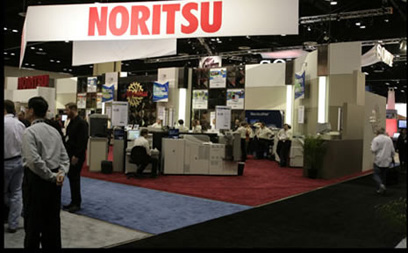
Black and white inkjet prints from Noritsu kiosk
The photographs here were taken with the dedicated MegaVision B&W medium format back. You can read about this system in our downloads. But for doing black and white digital photography in 2009 we are moving more to BetterLight (large format) and to Phase One (medium format).
 |
 |
|---|---|
This is the Noritsu kiosk that printed our black-and-white prints at PMA 2006 trade show. This uses Epson printheads.Rather nice for a kiosk. |
Here is the Durst printer at PMA 2006 that printed these files. It is the Durst printer on the right. |
Software for black and white conversion from color.
Although we prefer to do B&W digital photography with direct digital cameras (with no Bayer Pattern color filters), if you have a normal digital camera, as 99.9% of the world’s digital photographers do, then you can utilize special software for black and white conversion from color. The color conversion software that I know the best is Silver Efex Pro from Nik Software.
 |
|---|
| Black and white digital photography is the personal interest of Jacqueline and other photographers on the FLAAR staff. Here is Jacqueline on the black volcanic sand beach on the Pacific coast of Guatemala. Black sand is rare on beaches but it sure provides a nice gray for B&W digital photography. Jacqueline is the web designer for many of the FLAAR sites especially www.large-format-printers.org |
 |
|---|
| Here is another photo of Jacqueline Najera in Peten, Flores. This photo was taken by Jaime Leonardo. Jaime is photographer of FLAAR. He helps test digital camera equipment, especially of insects, flowers, and plants that were of importance in Mayan ethnobotany. |
 |
|---|
| FLAAR photographers are increasingly working on digital black-and-white IR photography. There will be several publications on digital infrared photography during 2009. Photography by Eduardo Sacayon, B'omb'il Pek, Jul lq'y San Simon, Coban, March 2009. |
Most recently updated March 9, 2009.
First posted June 20, 2006. Updated Feb. 13, 2009.
Free Reports (Inquiry Form)









Additional links of our FLAAR sites |
| Rigid Printable Materials |
| Printing on Glass |
| Sandwich board for recyclable furniture! |
| Metallic Effects |
Free Download Reports








































| Home | About Us | Consulting | About FLAAR Reports | Site Map | Privacy Statement | back to top | ||||||||||||
|
||||||||||||||||||
www.digital-photography.org is part of the FLAAR network © 2001-2021. If you notice a bad link, missing photos, misspellings, please report to the webmaster:  Updates on wide format printers from 2007 onward are contained in the FLAAR Report. We update these reports constantly, so check out the over 187 titles which are now available. Updates on wide format printers from 2007 onward are contained in the FLAAR Report. We update these reports constantly, so check out the over 187 titles which are now available.
|
||||||||||||||||||
 |
||||||||||||||||||


