
Reviews of the Hewlett-Packard HP Designjet Z2100 for giclee and fine art photography.
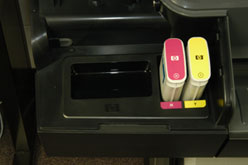
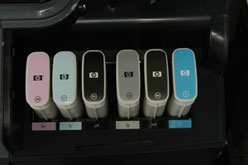
The HP Designjet Z2100 has eight ink channels:
Cyan, Magenta, Yellow, light Cyan, light Magenta, photo black, matte black, and light black. So that is 8 inks for the HP Designjet Z2100 printer. Do not confuse this with eight colors: you get four colors with lights of three and a switchable photo black and matte black.
 |
 |
Nicholas Hellmuth inspect the HP Designjet Z2100 inkjet printer. |
|
Cost comparisons and prices are tough, since these printers have premium features not found in the cheaper competition.
By the time you read this web page, Dr Nicholas Hellmuth will be in Barcelona visiting the world headquarters of Hewlett-Packard wide format inkjet printers to learn more about the HP Designjet Z2100 photo printer.
End-user comments on HP Z2100 photo printer for medium format digital cameras.
Global Imaging Inc is a premier resource for professional photographers, innovative pro-sumers, giclee and décor producers. They offer a diverse range of printers: Mimaki, ColorSpan, HP, and Epson. The advantage of learning about the new HP Z2100 and HP Z3100 printers from Global Imaging Inc is that they actually use all six brands of medium format digital camera:
Hasselblad and Imacon
Leaf Aptus
Jenoptik and Sinar
Phase One ( P25, P45, P30, etc).
Since we are still waiting for a Z2100 printer to arrive, we welcome the comments from a photography tech support person, R. Jack Ridley:
In regard to the new HP Z2100 printers.
Initial impression is very favorable. We currently have a 24” in the Dallas office and Louisville , Colorado has a 44” demo from HP. Both printers work very well.
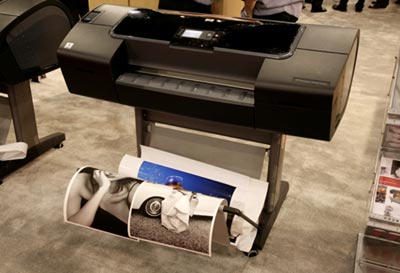 |
Sample processed using HP Designjet Z2100. |
I’m really impressed by the quality of the print produced. It produces very neutral B&W prints. I cannot notice any difference when printing B&W if you use the full set of inks or just the blacks. In order to achieve this neutral of a B&W on my Epson 4000 I have to use a RIP. When printing B&W with the HP I get much better contrast in the dark areas of the print and it also prints more ink on the sheet producing a getter density in the black.
The system for profiling other media works very well and allows me to use any media without having to worry about downloading profiles. We are currently waiting for some HP media to come in from HP. The color prints also have better color than those printed with the 4000.
A couple of issues I’ve seen so far are very minor. The first is paper loading. For the most part the loading works smoothly and easily except when loading a roll that has a ragged cut on the leading edge. Would like to see a override to allow scroll and cut to clean the edge. Also when printing out of CS2 and selecting “center” the image does not center on the sheet. I may be doing something wrong. Currently using no select on center and “clip” on layout to center the image.
For additions I would like to see a method to produce “toned” B&W images without using a RGB file. The current Imageprint RIP has a toning method that will single tone or split tone ray scale files.
The Louisville office had a concern. One is color management settings can be duplicated or switched in CS and HP print, i.e. “Let Photoshop” can be overridden by the wrong selection in the print window. They are also having problems with centering the image.
On the whole, we are very impressed by the new printer and looking forward to the 3100. I, quite frankly, can’t see how the B&W can improve much over what the 2100 is currently delivering.
 |
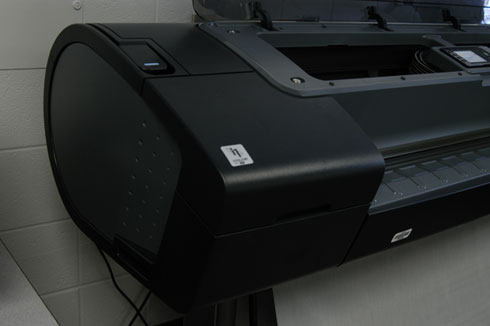 |
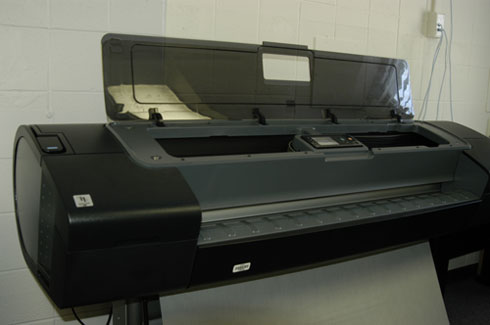
Hewlett-Packard HP Designjet Z2100. |
Note from the FLAAR editor:
It is nice to see honest comments that include pros and cons. Since Global Imaging also sells Epson printers it is not in their interest to be misleading about one, or the other.
We tend to use Wasatch, ErgoSoft, Shiraz RIPs, and do not support Imageprint RIP. What we notice about the HP Z2100 is that you can print direct from Adobe Photoshop without needing any RIP whatsoever. But if you are doing commercial production all day long, you will want a RIP sooner or later.
Every several years there is either a new Canon iPF printer or a new Epson or a new HP water-based printer. It is hard to keep track of the advances in inks and color management features. FLAAR is keeping track by visiting printshops around the world that have these various brands. Each brand has its good points and a few issues and an occasional deficiency.
The advantage of a place that offers both Epson, HP, and Epson is that they can provide some tips on the differences. If a store sells only one brand or the other, they will understandably push the brand they sell. One value-added retailer that we have visited several times is Parrot Digigraphic. They know each of the brands and models. Contact info is 978.670.7766.
 |
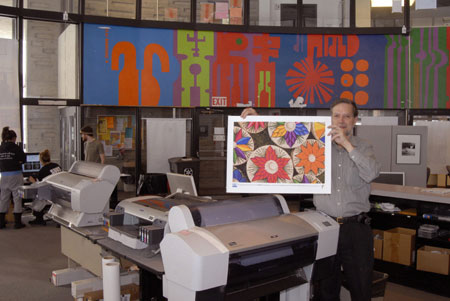 |
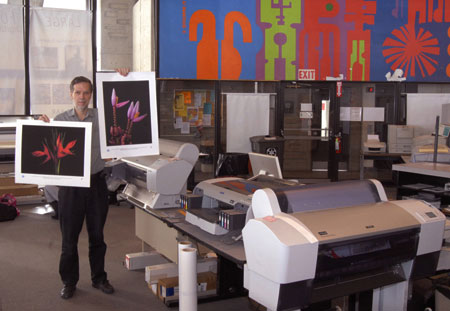
| Fine art photographs by Nicholas Hellmuth printed on the HP Designjet Z2100 at Parrot Digigraphic. These photos were taken with Phase One 22-megapixel and 39-megapixel backs and with a Canon EOS 5D. We do not yet ourselves have a 44" Z2100 so do not yet intend to evaluate it. Everyone tells us that it is very slow, but we would want to learn this ourselves. If the quality is outstanding, then the slowness is not as much an issue. Considering that in the past thermal printheads have been faster than piezo printheads, it is surprising to learn about its lack of speed. But if there is absolutely no banding, then I would accept the slowness. Banding is a serious issue with all printers and detracts from the professional quality of the image. |
Most recently updated Feb. 21, 2007.
First posted Sept. 25, 2006, updated Nov. 13, 2006.
The complete FLAAR Reports are in full-color PDF format. Our institute has comprehensive FLAAR Reports on over 73 different wide format inkjet printers, RIP software, color management, scanners, digital cameras and on countless markets such as wide format inkjet printers for photography, giclee, proofing, CAD, GIS, graphic design, signs, and specialty applications too. All FLAAR Reports by Dr Nicholas Hellmuth and his team are available on Wide-format-printers.NET

Free Reports (Inquiry Form)








Additional links of our FLAAR sites |
| Rigid Printable Materials |
| Printing on Glass |
| Sandwich board for recyclable furniture! |
| Metallic Effects |
Free Download Reports











































| Home | About Us | Consulting | About FLAAR Reports | Site Map | Privacy Statement | back to top | ||||||||||||
|
||||||||||||||||||
www.digital-photography.org is part of the FLAAR network © 2001-2021. If you notice a bad link, missing photos, misspellings, please report to the webmaster:  Updates on wide format printers from 2007 onward are contained in the FLAAR Report. We update these reports constantly, so check out the over 187 titles which are now available. Updates on wide format printers from 2007 onward are contained in the FLAAR Report. We update these reports constantly, so check out the over 187 titles which are now available.
|
||||||||||||||||||
 |
||||||||||||||||||


