
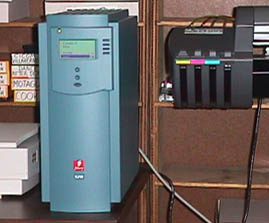
The ENCAD Nova Jet Pro 36 wide format printer with EFI Fiery PostScript RIP.
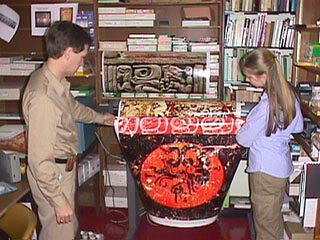 Back in 1997, everyone in our office wanted to take the first large format Encad color prints home to hang on their walls. All the visitors who came to the FLAAR photo studio to see the wide format color printer in action asked for sample prints to take back to their museums, universities and offices. Everyone else on the college campus wanted prints for their own use as well.
Once you have a wide format printer inside your own office, or at least accessible via network, then your whole outlook on the use of digital images changes quickly. The ability to produce professional exhibit quality posters, banners, and giant enlargements quickly and easily transforms your productivity. Actually if the printer is in your in-house graphics department or repro shop you can send images over the network (especially at night and on weekends when the network is less clogged).
If the printer is somewhere else in the city, and you have to drive over, or send files on a Zip disk or CD, then it may be so inconvenient that you don't want to bother. But if the printer is just a mouse click away (if you are a network) then you can print and have your poster, sign, or banner ready within a few minutes (presuming that everyone else in your building is not also sending images to print as well).
 Same at FLAAR, once we got an HP DesignJet we saw with our own eyes that the quality was better, and ease of use was substantially improved.
In other words, if the only printer you have ever used in your life is a 300 dpi, or even 600 dpi Encad, the results look great. But if you bring in any other brand of printer, you see the differences in quality and ease of use quickly.
The EFI Fiery RIP
This is the hardware Raster Image Processor which operates the wide-format printer. It is a dedicated server. Think of a RIP as a separate computer dedicated to taking care of doing the best possible job to create large sized color prints.
The Fiery RIP has its own processor inside. Operating on a network, it receives the file(s) from the main computer (in our case, a Macintosh). Within about 2 minutes the Fiery has taken a hold of the entire file, and immediately releases the Macintosh. This means you can continue to work on something else while the RIP processes the file and runs the ENCAD. Wonderful, no more waiting for the printing to be through (we tried a Hewlett-Packard printer and it took a lethargic 60 minutes+ to print). That is why we use a Wasatch, to overcome the on-board delay. With PosterJet (which we also use) it takes about 7 to 11 seconds for the printer to start printing.
 Downside of the EFI brand is that you can never update their RIP. We did not realize this the first two that we acquired. You are stuck with them.
Can't even use an EFI on any other printer either. It works only on a single printer.
These are reasons why many people prefer a software PostScript RIP such as ErgoSoft, Wasatch Onyx, or PosterJet. All these RIPs can be switched from one printer to another, and all these RIPs can easily be upgraded. Check out www.wide-format-printers.org for more information.
Encad NovaJet Pro 36
Already two years ago Roger Berg (Creative Photo of Columbia, Missouri) reported that most of his customers actually prefer an ENCAD print to a Cibachrome print from a traditional darkroom. Indeed, photographer Eldon Leiter, of Sedalia, Missouri, now has many of his exhibit prints done on an ENCAD instead using of traditional darkroom prints.
Del Fox, Director of Technical Services, BCC, capably hooked up the Mac to the Fiery to the Encad.

|
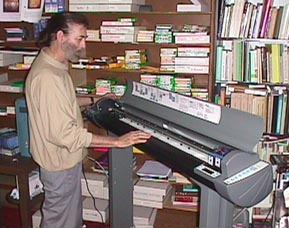
The particular Encad we have is a color inkjet printer with 36" capability. The ENCAD NovaJet Pro system is so good you can produce exhibit quality prints in your own office. Why bother with a darkroom when you can print directly from your computer?
All the key instructions are neatly printed on the lift-up cover of the printer.
We did not bother with a take-up roll since normally we print basic posters, signs, and simple enlargements. Also, to dry the prints I prefer to have the entire surface exposed to the air. It is easy enough to pull the print out a little on the floor if you are printing a banner-sized job.
Postscript
During 2005 we finally wheeled the Encad NovaJet 36 Pro out the door. It was donated to a charity, though they were aware that the printer had not worked for about 4 years. During these years we have switched both our university printing facilities to the HP Designjet 5000. We have a 42" HP 5000ps in Guatemala and a 60" HP 5000ps at BGSU in Ohio. These are real workhorses; great for general signage and giclee on watercolor paper or canvas.
We use Wasatch SoftRIP at BGSU and PosterJet in Guatemala during 2005. Currently we have dropped PosterJet, continue with Wasatch SoftRIP and are testing Shiraz and Caldera and also interested in ErgoSoft.
Most recently updated April 2008.
Posted early 1998, updated March 16, 1999; revised Aug. 8, 1999, updated Aug 3, 2005.
 |
 |
 |
| You can order these reports from FLAAR |  |
|
Free Reports (Inquiry Form)










Additional links of our FLAAR sites |
| Rigid Printable Materials |
| Printing on Glass |
| Sandwich board for recyclable furniture! |
| Metallic Effects |
Free Download Reports

















































| Home | About Us | Consulting | About FLAAR Reports | Site Map | Privacy Statement | back to top | ||||||||||||
|
||||||||||||||||||
www.digital-photography.org is part of the FLAAR network © 2001-2021. If you notice a bad link, missing photos, misspellings, please report to the webmaster:  Updates on wide format printers from 2007 onward are contained in the FLAAR Report. We update these reports constantly, so check out the over 187 titles which are now available. Updates on wide format printers from 2007 onward are contained in the FLAAR Report. We update these reports constantly, so check out the over 187 titles which are now available.
|
||||||||||||||||||
 |
||||||||||||||||||


